Tired of wasting hours manually logging all your business trips in a little book, scribbling notes and details until the sun goes down and the office empties?
Switch to the simplest, fastest and most efficient way to track your business trips – GPS logbooks – where every metre can be logged automatically and accurately.
Your trip-logging life is about to get a lot easier.
In this article, you will:
- Learn about the mechanics behind GPS logbooks
- Understand the benefits of GPS logbooks over traditional methods
- Get to know the functions and features of GPS logbooks
- Explore an easy guide to implementing GPS logbooks in your fleet business
Introduction to GPS logbooks
Filling in logbooks by hand can be a real pain. It is tedious, time-consuming and prone to errors. Having to write down every detail of your vehicle’s movements by hand is bothersome enough. That is where GPS logbooks come in handy. They automate the process, saving time and ensuring accuracy in tracking your vehicle’s mileage.
GPS logbooks combine GPS technology with detailed recording. They automatically report where your vehicle goes, how fast it is travelling and other details to help keep accurate track of mileage, and you can mark areas as business or personal travel zones. Unlike classic logbooks that have to be written up, GPS logbooks do this automatically, always providing accurate information.
They make tracking easy and exact, showing the route taken, distance, time and stops. There is no need to write everything down, so there are fewer mistakes and tracking works better.
Whether you are managing vehicles, monitoring cargo or just logging trips, GPS logbooks make trip data more reliable and accurate.
What GPS technology is and how it is used
Before we go deeper into logbooks and how they are used, let’s quickly get to grips with GPS technology.
GPS stands for Global Positioning System; it is a satellite-based navigation tool that helps us pinpoint exactly where we are on Earth. The technology we rely on to navigate from one place to another, whether through Waze or Google Maps in our cars or on our phones, is known as GPS.
How?
With satellites orbiting the Earth. These satellites send signals to GPS devices on the ground. The devices calculate how long each signal from different satellites takes to reach them. Using this data, your GPS device can work out exactly where you are.
GPS is not just for getting directions. It is widely used to track practically anything that moves, from cargo to vehicles and even wildlife. This technology has established itself as an integral part of many kinds of industries and even functions, one of which is logbooks.
All the nuts and bolts behind a GPS logbook
The mechanics behind a GPS logbook are quite simple. It works by using GPS technology to track and record your vehicle’s movement.
To record the vehicle’s movement, the logbook uses GPS tracking. The GPS logbook is fitted with a GPS receiver that communicates with satellites through signals. These satellites continuously transmit signals containing precise time information and their location.
While you drive, your logbook quietly records all this information: where you have been, how fast you were going and even when you made stops along the way. You can also label trips as business or personal.
Then, when you want to check your trips in a GPS logbook, simply open your logbook reports and you will see everything in detail, from your routes to your mileage. This information can be downloaded or accessed through software applications.
It is basically like having a digital version of your manual business trip logbook that does everything for you.
If your fleet is large, with different types of vehicle, and you are worried about whether GPS technology will work in all of them, don’t panic, it will. The type of vehicle does not matter when it comes to GPS logbooks.
These devices are designed to be compatible with all types of vehicle, whether you drive a car, a truck, a van or even a motorcycle. As long as your vehicle has a power source for the GPS logbook, such as a battery or a connection to the vehicle’s electrical system, you are good to go.
Your vehicle’s OBD-II port can improve GPS logbook accuracy
Most modern vehicles come with an On-Board Diagnostics II (OBD-II) port, which is a standardised diagnostic port found in cars and trucks made after 1996. This port allows external devices, such as GPS logging devices, to connect directly to the vehicle’s on-board computer system.
Using the OBD-II port, GPS logging devices can access valuable information about the vehicle’s performance, including speed, engine revs and fuel consumption. This information can then be used to track the vehicle’s movements accurately, and much more.
With an OBD-II port available, you can simply plug in a compatible GPS logging device and start tracking your trips with ease. It is a convenient, hassle-free way to monitor your vehicle’s use and even its expenses.
And before you ask, yes, you can still use a GPS logbook without an OBDII port.
Although many GPS logbook devices are designed to connect to the OBD-II port to collect vehicle data, some GPS logbook devices do not require it. They rely on GPS satellite signals and built-in accelerometers to record the vehicle’s location and calculate the distance travelled, which is then used to generate an electronic logbook.
But remember that GPS-only logbooks may not be as accurate as those that use OBDII data. Because a GPS signal can be affected by weather, terrain and tall buildings.
Traditional logbooks versus the revolutionary GPS logbook
Although traditional logbooks have served their purpose for decades, they have inherent limitations:
Prone to human error: handwritten entries can be inaccurate or incomplete, leading to discrepancies and possible tax headaches.
Time-consuming and laborious: logging trips by hand, calculating distances and collating data is a tedious and inefficient process.
Susceptible to loss or damage: Physical logbooks can be lost, damaged or even stolen, compromising valuable business records.
Limited insights: Traditional logbooks offer basic data, without the depth and analysis needed to optimise fleet performance.
Inconvenient storage: physical logs need a lot of storage space. And even if you keep them clean and tidy, they are more vulnerable to damage or loss, leading to lost information further down the line.
The shiny new GPS logbook, on the other hand, can ease the modern fleet manager’s workload.
In their arsenal they have:
- Real-time tracking: shows the exact location of all your vehicles in real time.
- Automatic data capture: your GPS logbook records information such as trip duration, distance travelled and the stops you made along the way
- Easily accessible logbook reports: The system creates easy-to-read reports summarising your trips. These reports give a clear picture of how your vehicle was used, including trip histories, mileage summaries and much more.
But the differences, or rather the benefits, don’t stop there:
Beyond basic GPS tracking, GPS logbooks can be used with fleet management solutions such as Cartrack Mozambique to give fleet managers an easier way to monitor each of their vehicles:
- Fuel management: monitor fuel consumption, identify areas for improvement and reduce fuel costs.
- Harmful driving alerts: identify and address unsafe driving practices to promote a safer fleet.
- Real-time tracking: monitor your fleet’s activity in real time, gain valuable insights and respond promptly to situations.
From this brief explanation, I’d say GPS logbooks would be managers’ preferred choice. It is not just an upgrade, it is a transformation for businesses looking for efficiency, compliance and cost savings.
But whichever you choose, remember that both serve the purpose of tracking the vehicle’s mileage and use.
How are GPS logbooks used?
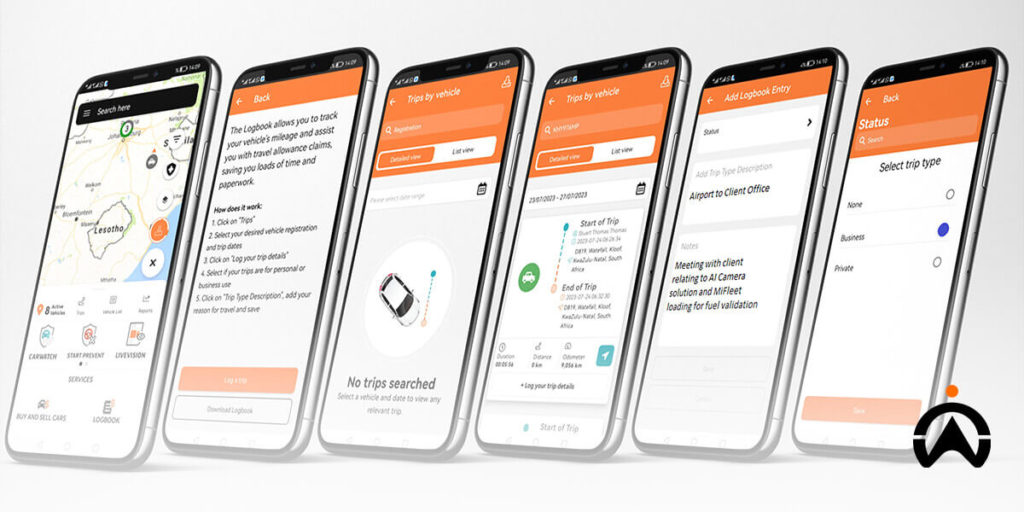
Even though this logbook has automatic features to get the job done, it still needs your help to get started; simply owning one is not enough. To really reap the benefits, you need to know how to use its features effectively.
Here are a few tips to help you get the most out of your GPS logbook:
- Use automation wisely:
– Turn on automatic trip recording: make sure your device starts and stops trip recordings automatically to track all mileage accurately.- Sync with your vehicle’s odometer: if possible, sync your device with your car’s odometer for even more accurate mileage tracking.
– Consider expense import features: if available, import expenses directly from your bank statements or fuel cards to simplify expense management.
- Improve data collection:
– Classify trips correctly: label trips as business, personal or other to make expense reports and tax deductions easier.- Include relevant details: add notes on the purpose of each trip, passengers or toll costs for better expense control and record-keeping.
– Track additional expenses: if needed, use the logbook to monitor other vehicle-related costs, such as parking fees, repairs or maintenance.
- Use reporting tools:
– Create custom reports: use the reporting features to generate reports tailored to your needs, such as monthly summaries or expense breakdowns.- Export data for analysis: export data in different formats to analyse it further in spreadsheets or accounting software for deeper insights.
– Share reports digitally: share reports electronically with your accountant, employer or other parties for efficient collaboration.
Your step-by-step guide to implementing GPS logbooks in your business
Using technologies such as GPS logbooks can greatly improve your fleet’s performance, streamline operations and increase profitability.
To begin with, you want to work out the best solution for your business needs. Research and compare different GPS logbook providers, considering factors such as mileage tracking requirements, reporting needs and the features you want, such as route optimisation and fuel tracking.
Next, plan and communicate effectively with your team. Make sure everyone understands the goals of implementing GPS logbooks and the benefits they offer. Give clear instructions and communicate openly about data privacy measures during training sessions.
Once you have selected a solution, go ahead with installation by following the manufacturer’s instructions for fitting GPS devices in your vehicles. Create individual accounts for drivers on your fleet platform and adjust the settings to suit your preferences.
After installation, make the most of the data collected by regularly analysing reports on mileage, fuel consumption, driver behaviour and route efficiency. Use this information to optimise routes, reduce idle time, promote responsible driving and identify opportunities to cut costs.
Lastly, encourage feedback from your drivers on how usable and effective the system is. Keep your GPS logging software and devices up to date to ensure performance and safety at their best.
Cartrack Mozambique seamlessly integrates GPS logbook technology into its services, ensuring compliance with SARS regulations while offering a range of user-friendly features.
Cartrack Mozambique’s SARS-compliant logbook simplifies mileage tracking for individuals and businesses. By using GPS technology, Cartrack automates the process of recording and categorising trips, ensuring accuracy and efficiency.
With Cartrack Mozambique’s GPS logbook, users can:
View all your trips: Access a comprehensive record of every trip made, including details such as date, time, distance travelled and route taken.
Keep a detailed trip history: keep a complete trip history with the option to add notes and comments for each trip.
Categorise trips: easily classify trips as business or personal, simplifying expense reports and tax deductions.
Monitor the distance travelled: monitor the total distance travelled over a selected period, providing valuable information on vehicle use.
Export data in a SARS-ready format: generate reports in a format that meets SARS requirements, simplifying tax filing and reporting processes. Ready to turn trip information into tax-compliant business travel claims? Get ready for simple trip management with our GPS logbooks. All you need to do is become a Cartrack Mozambique customer, download the Cartrack mobile app and follow the easy instructions in our GPS logbook video to get started. Click the link below and watch the video:
From the chaos of manual trip logging to fully automated control: Get Cartrack Mozambique’s advanced trip logging app
As a fleet manager, you already have enough responsibilities to deal with, so let’s make one of them easier with GPS logbooks. This automatic, paperless feature with accurate data can save you time so you can focus more on your other fleet duties.
Contact Cartrack today Mozambique to find out about our solutions for fleet management.
 South Africa
 Botswana
 Kenya
 Malawi
 Namibia
 Nigeria
 Swaziland
 Tanzania
 Zimbabwe
 Hong Kong
 Indonesia
 Singapore
 Malaysia
 Philippines
 Thailand
 New Zealand
 Vietnam
 Poland
 Portugal
 Spain
 United Arab Emirates

 PT